Posts

Keys To Success: Greenlight Post-Mortem

Image
Hello everyone! Starting off, after 22 days, we are happy to announce that Keys To Success was greenlit a few weeks ago! We’d really like to thank everyone who supported us, either by voting or spreading the word around or showing us support! We are really grateful for that! Though we are not experts, we felt we wanted to share the little knowledge we have about Steam Greenlight and some ways to getting greenlit. Since we struggled to find online information about tips and tricks to it, we thought we should share our experience in case anyone found it helpful! So, starting off in case you’re not familiar Steam Greenlight, you can check   here   for Valve’s description and FAQ’s about it. Briefly, it’s the community in Steam help pick new games to be released on Steam by voting for it. When a game gets enough votes, it gets greenlit and gets to be published on Steam. Sounds easy enough? Sadly, that’s misleading because the amount of submitted games every day is hug...

Keys to Success Development Diary - Log #2

Image
Support Keys To Success on Steam Greenlight! Does the game inspire the creator? Or is the game inspired by the creator? I suppose the logical answer is: “Of course the game is inspired by the creator! Without the creator, you know.. there will be no game!” Well, technically true. I can’t argue with that. But can’t it work the other way around as well? Have you ever thought of that? But I believe that in both cases, it affects powerfully the way the game is shaped in the end. If a game inspires you, it’ll bring out the best in you. You’ll find yourself working on it creatively, with so much hunger for work. Largely it depends on the way you’re adding to it and trying to make it grow. If it stops inspiring you, then you’re doing it wrong. Stop, backtrack to where that started and start again. This sums up the core of the game design process in my opinion. For Keys to Success  (K2S for short),  the backtracking showed me that a story is a necessity. The game d...

Keys to Success Development Diary - Log #1

Image
Hello!  Welcome to Keys To Success’ first development log. I have been thinking about starting one for a long while now ( Recording everything must be fun!)  and to try and share the little bits of knowledge I gather along the way. So finally, I decided to write down the very first log. I feel like once the first has been written down, the rest will surely follow. I am hoping to find the creative and technical  approaches to making good games through Keys to Success, and convey them through a development diary.    So, Keys To Success is about to meet its first birthday; it was initially created during the Global Game Jam in January 2015. Looking back, I never thought of having the game grow to what I want it to be at the moment. Back then, the prototype was made for the jam, with an idea to offer and that was just it. But when the game won “Microsoft’s Best Game Award” and got the Imagine Cup Golden Buzz, I decided to try exploring the game more. I ...

Why you should use "Advanced texture type" more part 2 - Unity3D

Image
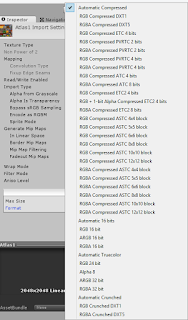
Hey again, Last time we talked alittle about what advanced texture type is in Unity. This time I will go deeper into the types of texture compression. But before we jump in xD I just want to say that this post is meant as a basic entry guide to the big world of texture compression, which I'm still beginner at and I'm exploring it with you. So let me know your feedback and what you think! And again this isn't meant to be detailed explanation of every thing. - if you want more details, I will add references below. All the textures compression discussed here you will find them in Unity "advanced texture type" , with more detailed names. In order to make it easy for you to understand these names, I will add a little section at the end for that :) . Let's start with what the need for texture compression is for. For example, you can open any png image on your pc (let's say it's a 1024x1024 size) you will find it around 1mb that's not bad, righ...

Why you should use "Advanced texture type" more - Unity3D

Image
Welcome unity developers. Let me start with our normal workflow in unity. When we want to add a sprite into the game we just simply drag and drop it into the assets folder and we always remember to change the texture setting to sprite Same if you are using texture or normal map or any other type, you always remember to change texture type to its corresponding one. But let me ask you , how many times have you considered using advanced or actually though about what is its use ?! Don't worry I barely thought about it, not until recently a friend of mine introduced me to series of blog posts ( check the reference below ) from which it came to my mind to apply them to unity and you will see lots of real magic xD. Before we jump in let me clarify few points:  - This is kinda a very long subject so I will split it into series of blog posts .  - What is advanced texture type ? When you choose a texture type what unity do is choose the best setting for your ima...